
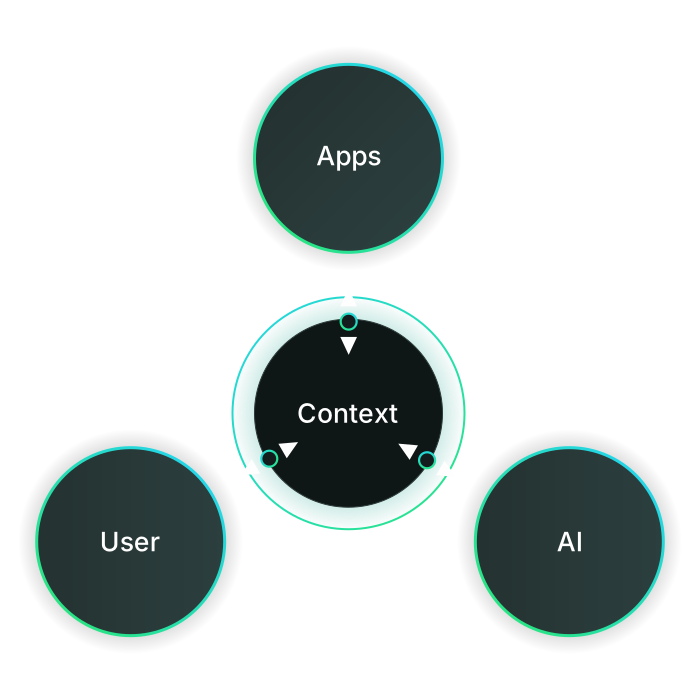
The quality of AI results depends on the context available. Gathering it, handing it over to the AI, and preserving it usually falls to the user today, on top of the actual work.
01
Information is scattered across mail, calendars, notes, and tasks, as well as files and folders. Connections have to be made by hand and pieced together again and again for new chats.
02
AI can only use context that has been handed to it beforehand. Data reaches the AI via upload or copy and paste. The information is then available, but not its connections: the user has to explain repeatedly what belongs together, how, and why.
03
New content is created in the chat, separate from the context. With every further action, more relevant content is missing there. The AI thus works alongside the context instead of within it. The consequence: the user has to bring the results back into the context by hand.
Gathering context, handing it over to the AI, and preserving it: our Context Manager app takes on these tasks. Context emerges organically as you work instead of being pieced together from scratch every time. ānbāsan automatically brings data together across apps, and the AI works directly within it. We call this context-driven working (CDW).
01
Gathering and managing context — effortlessly across apps
Emails, appointments, notes, and tasks, as well as files and folders, flow into the context automatically as you work. The Context Manager recognizes relationships, assigns data automatically, and forms topic clusters. Connections are made once and are ready for new chats. The final decision remains with the user: assignments can be adjusted at any time.
02
Handing over and using context — simple and straightforward
Context can be copied as a reference, optionally with the entire Knowledge Map and all relationships between the relevant data. Pasting it into the AI chat is all it takes. What belongs together, how, and why comes with the context itself.
03
Staying in context — and preserving it
Via the open MCP standard, the AI works directly within the context instead of alongside it. It loads the data it needs and saves new content where it belongs. The context thus keeps growing with every action, with no manual transfer back.
Feel free to get in touch. Or dive deeper first – here are all the features.
The video shows what Context-Driven Working can look like – one of many possibilities. The data in the example was consolidated and linked by the Context Manager in the background.
01
Choose a data set
Select a data set – here, our sample data set.
02
Copy the knowledge graph
Copy the knowledge graph to the clipboard: which data is in the context and how it connects.
All at the push of a button, system-generated.
03
Paste into the AI chat
Paste it into the AI chat and get started right away.
04
The AI works within the context
From now on the AI works within this context too: searching data, retrieving knowledge graphs or saving results in the right context. In the example it summarizes the relationships, loads an email, and creates a note.
05
Save new data
The AI files the note back into the context.
No more searching, copying and re-saving files. Just paste the context and get going. No more errands – no more fetching and filing data, just stating what should happen.
A seamless workflow without friction. That is exactly what Context-Driven Working makes possible.
The example step by step: how context emerges from distributed data, how AI works within it, and how results flow back. Read the blog post.
Context-Driven Working works at every level – from the individual user to entire organizational units. The context stays the same, only its scope grows.
01 · Individual
Work with the AI directly in the right context – without searching, copying or filing data.
02 · Mehrere Personen
One shared context for everyone on the team – everyone works from the same level of knowledge.
03 · Mehrere Teams
Contexts linked across team boundaries – knowledge flows between areas instead of fading out.
All data stays in the EU. Your context, your data – your property.
Content stays at its source. Only the necessary metadata is synchronized.
Usable with any AI application via the open MCP standard, entirely without lock-in.
Get in touch right away.
Context-Based Working describes how work is done. The Context Manager implements it technically.
CDW
Context-Driven Working
The concept: data no longer has to be structured by hand for AI use. Context emerges organically, as a by-product of working.
CM
Context-Manager
The technical solution: assigns data automatically, forms topic clusters, and keeps the context up to date.
CaaS
Context as a Service
The Context Manager provides the context as a service – among other ways via MCP servers, directly usable by any AI tool.
CL
Context Layer
The layer where the context lives – between app data and AI, reachable from both sides.
AI tools
Access via MCP
Context-Layer
Maintained by the Context Manager (CM)
App data
...
MCP (Model Context Protocol) is an open standard that enables AI applications to access external data and tools.
Each request receives only the relevant slice of the context – not indiscriminately everything that might somehow fit. This lowers input token usage. And because the context is right from the start, fewer follow-up questions are needed to reach the desired answer: this saves output tokens and iterations.
Analyzing the cause and consequence: AI requires precise context, shifting the burden of manual data preparation onto the user.
Data is scattered across apps for emails, notes, tasks, and files. As a result, AI lacks the necessary connections. Result: missing context leads to generic or incomplete answers. The true potential of AI remains untapped.
The less precise the context, the more irrelevant data is processed – and the higher the token usage.
Users have to gather the data themselves, for every app, before handing it to an AI. That costs time and is avoidable effort. In both directions.
Most apps store information but don't connect it meaningfully. That is exactly where productive AI fails. ānbāsan turns scattered knowledge into a usable working context – so AI doesn't just answer, but helps right on the spot. Emails, notes, documents, files, and tasks exist separately from one another. Users hold the connections in their heads – AI doesn't.
The solution is Context-Driven Working (CDW): instead of requiring afterthought organization, context develops natively alongside your daily workflows — seamlessly integrating with emails, notes, events, files, and tasks.
Digital work doesn't fail for lack of information, but because that information is managed too dispersed and without relationships to one another. Emails, notes, documents, calendar data, tasks, files, and AI chats together create a valuable information space – which is, however, often scattered and hard to use as a coherent whole.
Context Management with a context-driven working model starts exactly there: information isn't just stored, its relationships are consistently captured as it is created. The goal is not order for order's sake, but the best usability in everyday work – without extra effort.
All relevant information in one place instead of spread across five apps. Easily reachable by navigating within the context.
No extra data room, no pre-sorting: the context organizes itself automatically according to your own rules. MCP makes access easier.
The AI works with complete, fitting context instead of fragments.
Targeted context lowers input token usage. Accurate answers save iterations and output tokens.
Instead of indiscriminately sending along everything that might fit, each request receives only the relevant slice of its context. Depending on the use case, this lowers input token usage by 10–55%. And because the context is right from the start, fewer follow-up questions are needed to reach the right answer – the AI gets to the point faster. Proportionally, that also saves output tokens and entire iterations.
The actual savings depend on the data situation, the model and the use case.
Live demo, questions or want to dive deeper? Get in touch – or first read more about Context Management.
For new features and learnings around Context-Driven Working, there's also the newsletter.
Would you rather write to us directly? Feel free to email contact@anbasan.com.