
ānbāsan - work with | in context
Work smarter with Context Management
Context Management helps users connect information effortlessly and meaningfully instead of merely storing it. Content, tasks and knowledge become easier to understand, easier to find and directly usable in everyday work — including with AI.
A context layer between apps, users and AI
Notes
Tasks
Files
Calendar
...
Context
Auto-assign & clustering
// What makes ānbāsan special
Context-based working.
In and with context.
In many digital work environments, information is scattered across different apps: notes, tasks, documents and communication exist side by side. What's missing is an immediately usable connection between them.
This is exactly where ānbāsan comes in – content isn't treated in isolation but linked together, creating context that is usable right away.
See information in context
We also organize content by its relationships. This reduces search effort and helps turn fragmented data into a clear, comprehensive picture. Dynamic structures replace static folders.
Search less, understand more
Relevant information is available right where it's needed – without detours and without losing context. That saves working time.
Context supports decisions
When data, notes and tasks are connected, it's easier to form a complete picture, back up decisions and derive next steps.
More precise AI answers
With complete context, AI delivers precise, accurate answers – not superficial, but exactly to the point.
// Conzept: CDW
Context-Driven Work / CDW
CDW is the conceptual model behind ānbāsan: context doesn't arise as an extra task but organically from your normal work. Every email, note and task is automatically assigned to the right context – without users creating folders, tagging data or preparing data rooms.
Classic knowledge management
Effort that keeps growing
Create folders, tags and structures by hand
A separate data room for every AI application
Context reassembled before every request
Effort grows with every new tool
Context-driven working
Effort that stays constant
Context grows organically with every action
One context, any number of AI applications
Every query is automatically connected to the right context
Effort stays constant – regardless of the number of tools
// Technology: CM
Context-Manager / CM: the technology behind CDW
CDW defines the model; the Context Manager makes it work. It connects your data sources, automatically recognizes relationships, and uses Auto-Assign to place every new piece of information into the right context. The Context Manager continuously organizes related content into self-contained context clusters, creating the foundation for every AI application and interaction.
// Sources
Notes
Tasks
Files
Calendar
...
// Context Manager
Auto-assign & clustering
Detects relationships and assigns automatically
// Topics
Project
Concept
...
// Ecosystem: CaaS
Context as a Service / CaaS
The Context Manager makes your context available not only to you but also to your AI – as a context layer (CL) via MCP servers. MCP (Model Context Protocol) is an open standard through which AI applications access external data in a controlled way. ānbāsan uses it to provide exactly the portion of your context that matches your question – no more and no less. That is Context as a Service.
No data room needed
Any MCP-compatible AI accesses the context directly. Nothing needs to be uploaded or prepared.
Automatically the Right Slice of Context
Every question can be placed in the matching context. The AI receives only what is truly relevant – not everything that might theoretically fit.
Fewer tokens, fewer detours
Less irrelevant data in the prompt lowers input token consumption. Precise context leads to the right answer faster – with fewer follow-up questions and fewer output tokens.
// More about
Working with context
There are two essential areas for working with context.
Context Management
The intelligent management of all information that belongs together – automatically detected, semantically linked and freely structurable.
ānbāsan collects data from your tools (emails, notes, tasks …), detects relationships automatically and lets you link everything however you prefer.
Example: Open task → ānbāsan loads all related emails, notes, and topics. You can restructure, link, and organize everything as a parent topic or sub-element as you like.
Context Engineering
The targeted construction of data sets specifically for AI – for smart buttons, in-context AI chats and with automatic linking.
The context isn't just there – it's structured and directly usable. AI receives everything it needs to complete tasks quickly and precisely, according to your wishes.
Example: The "Write reply" button: AI uses context (customer, project, previous offers, requirements) and writes the draft. With the AI chat, you can ask questions and continue working within that context – everything remains contextualized and linked.
With a shared context, you and your AI work in sync. You both have the same level of knowledge – the AI completes tasks exactly as you want. Results that now precisely meet your expectations.
// Implementation
ānbāsan's core features
Beyond just apps and data – this is how the full potential of your data unfolds. Because the whole is more than the sum of its parts.
Organize data as context
Automatically or as you specify.
Connect external systems
Automatically create new context from data
Automatically extend context with new data
Get the right context suggested for your data
Manage context yourself – always in full control
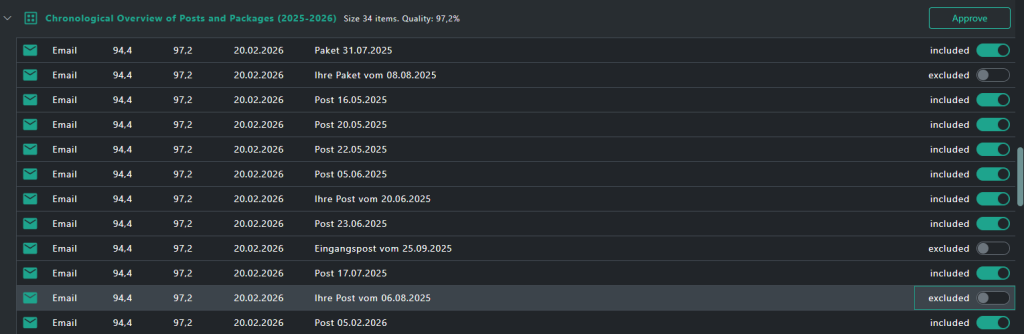
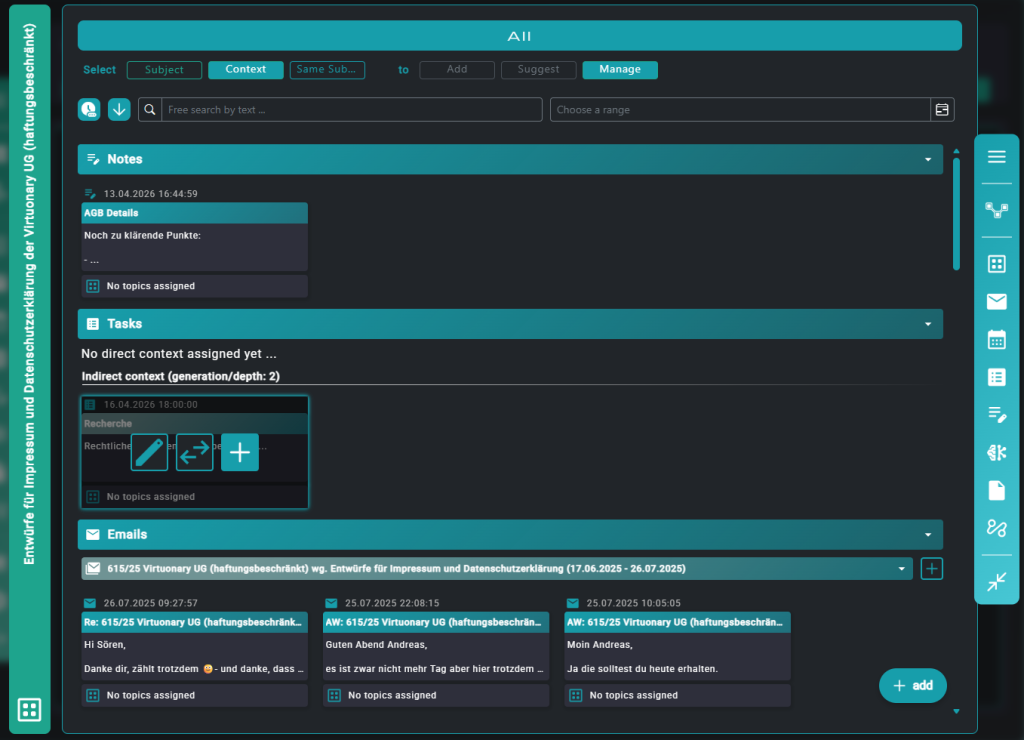
Work in and with context
Every piece of information has its own context you can work in directly, without detours.
Context-driven knowledge base
Navigate within context – find things fast, switch less
Add or remove elements – managed automatically by the system
Any structure – however deep, parent or child
Always in full control
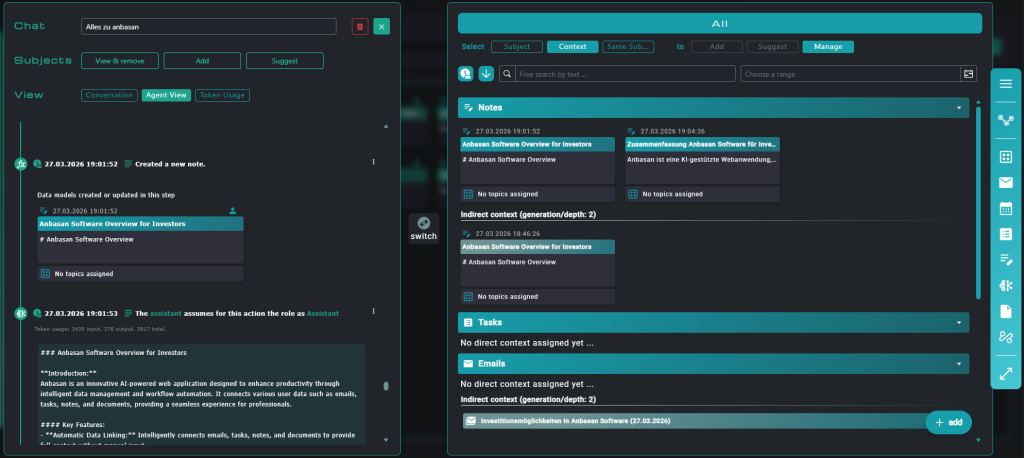
Mit KI im Kontext
The AI accesses the same context you do – and works right inside it.
Work freely in and with the context
Insert new elements into the context
Have smart buttons complete tasks on your instruction
Transparency – everything stays traceable
Always in full control
MCP-Server & Custom Connectors
Claude
ChatGPT
More to come ...
Data queries & workflow triggers
Document operations
System integrations
Connect AI tools effortlessly
Seamless integration of Context Management with AI tools and services – via MCP servers and custom connectors.
Connect to Claude via a custom connector
Connect to Claude via a custom connector
Interested in a live demo or have questions about ānbāsan?
Ready for a live demo, or have questions about ānbāsan? Get in touch with us now! Or if you’d like to learn more first, read on to get to know more on use cases, connectors, and more.
// Before · After
Users & use cases
Recognize yourself here? These are typical problems we solve – whether you're an AI power user, an AI user, or simply want to spend less time maintaining data and searching for information.
// Setup
Getting started is simple
Just 4 steps. ānbāsan can be introduced without changing your existing processes.
Register & connect data
Connect apps: Microsoft 365, etc. via OAuth – secure and simple. From now on, ānbāsan syncs your data automatically.
Set up context
To start, we organize everything according to your preferences – free, hierarchy-free, linkable however you like. And most of it automatically.
Connect with AI
We connect the app to your AI tools via custom connectors. Through MCP they communicate freely with ānbāsan.
Work with context intelligence
Smart buttons, AI chat, context navigation. One click – and the AI has access to the entire relevant context. From then on, the context organizes itself.
// Data sources
Connectors
Microsoft 365
Email, calendar, SharePoint, OneDrive, ToDo, OneNote.
Available
More
Google Workspace and others.
Planned
Your tool?
APIs + webhooks can be set up flexibly.
On request
More to come soon: further integrations are planned. Interested in a specific tool? Write to us: contact@anbasan.com
// Contact
Ready for the next step?
Live demo, questions or want to dive deeper? Get in touch!
For new features and learnings around Context-Driven Working, there's also the newsletter.