
work with | in context
Features
What truly matters isn’t where your data lives or which app manages it — it’s how everything connects. With our app, you can effortlessly organize and harness those connections, turning scattered data into structured, actionable context that works for you and your AI in every moment.
What makes ānbāsan special?
Four benefits you’ll feel immediately.
Save time
Less searching — all the information for a task or other item is automatically available, and AI can use it instantly.
Relevant AI results
With full context, AI delivers precise, error-free answers — not superficial, but exactly on point.
Save tokens
With the right context, only relevant data is available — and from that, AI selects the truly important information for the task at hand.
Privacy
GDPR-compliant through servers in the EU. Your context, your data — your property.
Working with context
There are two essential ways for working with context.
Context Management
Intelligent management of all related information – automatically recognized, semantically linked, and freely structured.
ānbāsan collects data from your tools (emails, notes, tasks, etc.), automatically recognizes connections, and lets you link everything according to your preferences.
Context Engineering
The targeted construction of datasets specifically for AI – for smart buttons, AI chats in context and with automatic linking.
The context isn’t just there – it’s structured and directly usable. AI receives everything it needs to complete tasks quickly and precisely, according to your wishes.
Example: Open task → ānbāsan loads all related emails, notes, and topics. You can restructure, link, and organize everything as a parent topic or sub-element as you like.
Example: The “Write reply” button: AI uses context (customer, project, previous offers, requirements) and writes the draft. With the AI chat, you can ask questions and continue working within that context – everything remains contextualized and linked.
Your advantage
With a shared context, you and your AI work in sync. You both have the same level of knowledge – the AI completes tasks exactly as you want. Results that now precisely meet your expectations.
The core functions of ānbāsan
Beyond apps and data — this is where the full potential of your data unfolds, because the whole is greater than the sum of its parts.
Organize data to context
Happens automatically or according to your preferences.
- New data is created as a new context or assigned to an existing one.
- You can also make assignments manually.
- The app helps you find relevant data easily.
- You always stay in full control and have the final say.
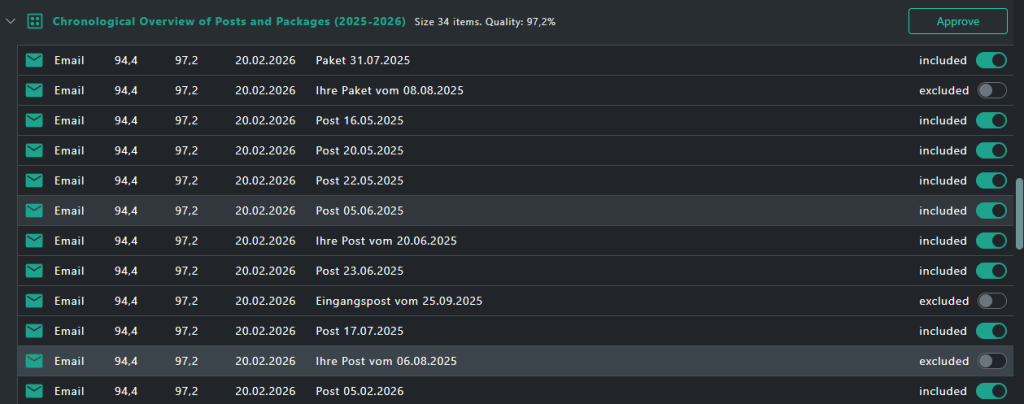
The app helps you identify, group, and manage related content with precision. In the screenshot, you can see how data is automatically organized and can be adjusted manually when needed — saving time and keeping everything clear and structured.
The visuals reflect the current development stage and may change as the product evolves.
Work in and within context
Every piece of your data comes with its own context — a space where you can work seamlessly and stay fully focused.
- Add new elements directly within the context and see them automatically connected.
- Navigate smoothly between related items without interrupting your flow.
- Build flexible hierarchies — from parent topics down to nested details.
- Expand as deep as you need — no limits, no constraints.
- Update or remove contexts anytime to keep information relevant.
- Receive intelligent suggestions that seamlessly expand your context.
- You stay in charge — full control, always your final decision.
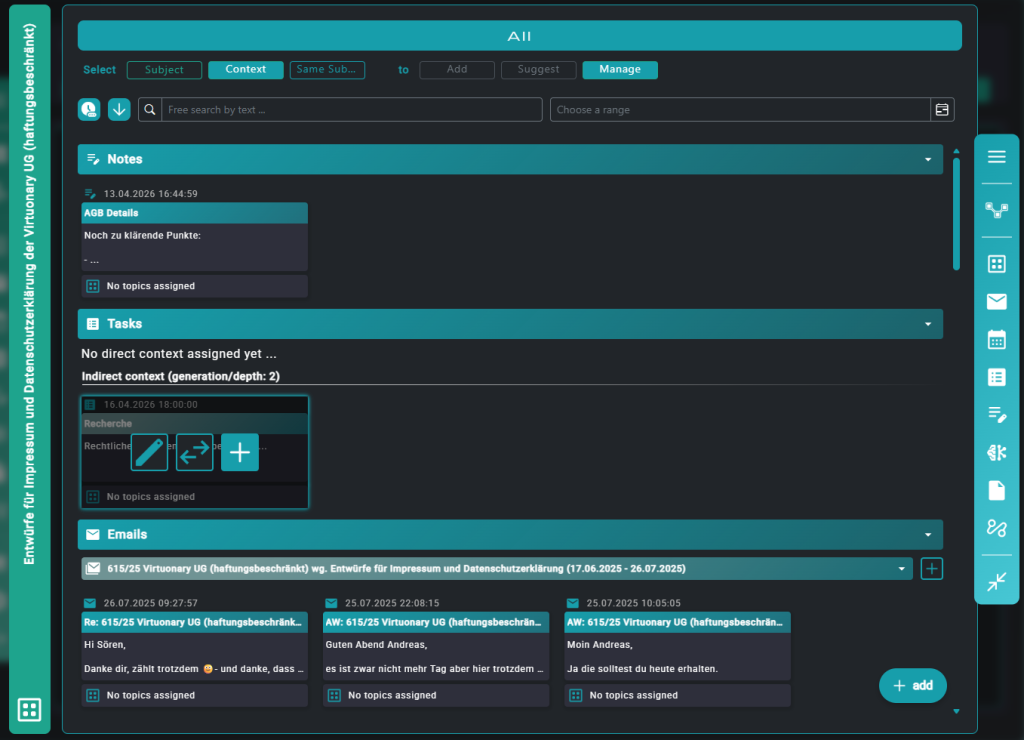
Here you see how various content types merge into a single, connected context. That’s how data relationships become seamlessly usable — enhancing your work and any AI relying on the same foundation.
The visuals reflect the current development stage and may change as the product evolves.
AI within context
Every piece of data has its own context that the AI can access and work in — just like you.
- Add new elements directly within the context.
- Use Smart Buttons to let the AI complete tasks based on your instructions — all within context.
- Everything remains clear and traceable.
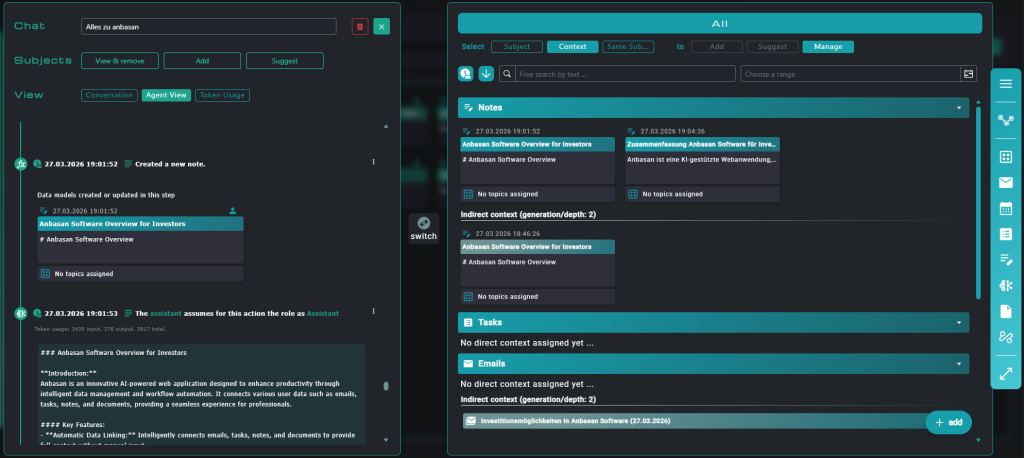
The AI works right beside you — in chat and across tasks — while you stay fully in control of your context. Everything stays connected, clear, and instantly usable. When the AI creates a note or email for you, it appears right in the chat as context, ready for you to act on it seamlessly.
The visuals reflect the current development stage and may change as the product evolves.
Ready for a live demo, or have questions about ānbāsan? Get in touch with us now! Or if you’d like to learn more first, read on to get to know more on use cases, connectors, and more.
Use Cases
Do you recognize yourself? Here are typical problems we solve – and the people who have them.
📚 Many projects & context switching
Typical users⚠️ The problem
You’re juggling 5-15 projects simultaneously. Each one involves different partners, data, status, tools, and communication channels. Every switch takes time; everything is scattered. In each channel, you have to re-organize the data for each project.
- Emails from Tool A, notes in Tool B, etc. – where was the task for email X from Y again?
- Constantly switching between systems costs time and focus.
- Tagging and assigning everything anew in each system costs time and energy.
- And if you need something for the AI, you have to gather everything again… which takes more time. And then you have to manually organize the results yourself. That takes even more time.
✓ This is how we solve it
- One click per project: Full context loads (all emails, notes, tasks, …)
- Automatic topic assignment: we find the relevant context and hold everything there as well.
- Free hierarchies: Organize projects and everything around them however you like – per project, per sub-project, as a mix, … there are no limits to you.
- Result: No need to search for information, everything is there, with one click and always perfectly organized!
🧠 Personal “Second Brain”
Typical users⚠️ The problem
You don’t just want to store your information, you want to find it again and actively use it. But in reality:
- You take notes, but later you ask: “What was this originally related to, what was the connection?”.
- You’re looking for a task and you roughly know what it was related to, email X – but that doesn’t help you because the two aren’t linked in your system.
- Double work: You have to restructure and organize your data in every tool.
- You want to fully exploit the potential of AI and use it to your advantage – but for that to happen, the AI needs to know what you know and understand the context. To achieve this, you always have to piece together the context first, like a detective.
- …and that means less focus and productivity.
✓ This is how we solve it
- Personal topic spaces: You organize your knowledge optimally for yourself: “AI”, “Marketing”, “Productivity” – even overlapping and with multiple assignments, everything is possible.
- AI support: Ask questions directly within and related to the context. “What was the reason for… again?” or have tasks or summaries generated from the answers. Everything remains perfectly organized and within its context.
- Dynamic updates: New content is automatically sorted into the correct topic rooms.
- Result: Top organization of your thoughts within the system, AI has its context – knowledge capital effectively used.
💬 Customer care, support & sales
Typical users⚠️ The problem
Many customers, many inquiries, lots of correspondence. And much of it is repetitive. But a ticketing system or CRM isn’t right for you.
- Your tasks are often repetitive – you’ve answered the same type of email for the 10th time.
- Your email inbox is overflowing, and keeping it organized is a real chore and a challenge.
- Your data is scattered – for whom was what to do? Has that been done yet? Let’s find it first…
✓ This is how we solve it
- Smart Buttons: your data is structured and organized – simply click “Reply email” and generate a suitable response. All based on context.
- Create and maintain order: suitable topic spaces are suggested for new content. The system adapts to your data structure.
- Perfect organization: all data is interconnected. What response was given to the customer, and what other information is attached? Everything is available within the context that is automatically loaded. Directly and without detours. Whether it’s a ticket, inquiry, or quote.
- The result: less work, less stress, more efficiency. And complete clarity.
Here's how easy your start is
Only 3 small steps are needed.
Step 1: Register and connect your data
You connect your tools: Microsoft 365, etc., with OAuth – securely and easily. ānbāsan will now automatically synchronize your data.
Step 2: We'll set up your context together
With the tools in ānbāsan, we organize everything according to your preferences from the start – completely free, non-hierarchical, and linkable as desired.
Step 3: Work with contextual intelligence
Smart buttons, AI chat, contextual navigation – use AI to complete tasks precisely. One click = AI has access to the complete relevant context. The context then organizes itself automatically, or according to your preferences.
Connectors
Microsoft 365
Email, Calendar, SharePoint, OneDrive
Google, ...
In planning …
Your tool?
APIs and webhooks can be configured as needed
More to come soon: Further integrations are planned. Do you have a specific tool in mind? Write to us: contact@anbasan.com
Contact
If you’d like to stay up to date on new features and insights into the paradigm of context-focused work, sign up for our newsletter.